Trust Root Configuration
Time estimate: 15 minutes
The Control Plane PKI exercise is a prerequisite for this exercise. In particular, you need to know how to install a TRC and list the TRCs on a host.
The goal of this troubleshooting exercise is to understand the impact of Trust Root Configuration (TRC) issues, learn how to detect and resolve them. In particular, you will work on an exercise, where you are first asked to execute a given script which prepares the setup for the exercise. This script applies some changes which introduce a TRC related issue on one of the SCION hosts. Then, the exercise will attempt to walk you through the steps that you need to take to discover the issue and then solve it.
Overview
Refer to the diagram below, which visualizes the network topology we work on in this hands-on session. The depicted infrastructure consists of an ISD, called Finance ISD, which has three ASes:
- Webspeed (ISD-AS 1-ff00:1:1)
- Corpbank Switzerland (ISD-AS 1-ff00:1:2)
- Stabank Private Banking (ISD-AS 1-ff00:1:3)
The Webspeed AS consists of three sites in Zurich, Geneva, and Lugano. Each of these sites includes
exactly one host. These hosts are called core.zurich.webspeed, core.geneva.webspeed, and
core.lugano.webspeed, respectively. This is a core AS.
The Corpbank Switzerland AS has two sites, one in Geneva and one in Zurich. Both of them have a
host, respectively called edge.zurich.corpbank and edge.geneva.corpbank. Furthermore, the
Stabank Private Banking AS includes only one site, in Lugano, with one host, called
edge.lugano.stabank. They are both leaf ASes and each of them is connected to the Webspeed AS via
two links, as depicted in the diagram below and here for a fullscreen
view.
Over the course of this lab, you will be working in a cloud-hosted playground of the SCION infrastructure. All the ASes run in a virtualized environment on a cloud machine.
Exercise
To get started with this exercise, you first need to run the following command:
operator@training:~/workspace$ ./appliance_trc_exercise setup
This command will execute a script which applies some changes that result in a TRC related issue. The purpose of this task is to teach you how to find and fix that issue.
After the preparation made by executing the script, one of the nodes should have a TRC related issue.
In practice, you should be informed of such a problem via an alerting system that sits on top of your monitoring endpoints. In the training setup, we do not have such an alert notification system in place, but you can see the list of alerts in the Prometheus instance. Check out the firing and pending alerts in the alert page. The SCION host with the TRC issue should have triggered the following alerts:
SCIONSegmentRegistrationInternalErrorSCIONBeaconReceiveErrorSCIONBeaconOriginationErrorSCIONCryptoSignatureVerificationError
Read the description of the triggered alerts and evaluate the impact. In order to understand the issue with beacons, we could check the Grafana monitoring dashboards. See Monitoring for more details on how to investigate the monitoring data in the Grafana dashboards.
The alerts are marked as pending before they are marked as firing. Hence, if you cannot find the alerts you are looking for under the firing category, check the pending alerts as well.
Now, open the Beacon Module dashboard and check the monitoring data there. In particular, if you check the diagram with the title Beacons Received Errors, it should be similar to the figure below.
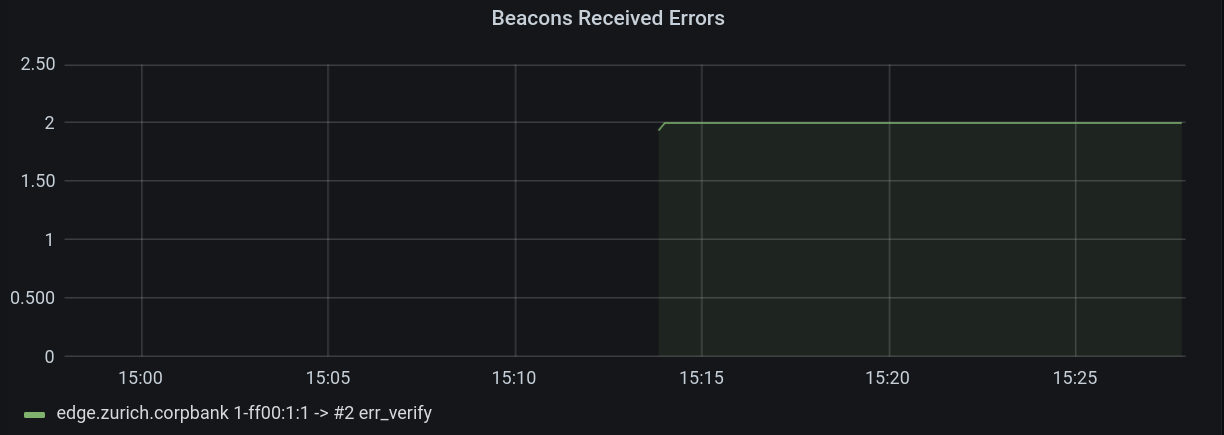
What relevant information can you derive from this monitoring endpoint and the above alerts?
Solution
As you can see from the description of the alerts, they are related to the beaconing process and the SCION Control Plane PKI. Without configured TRCs the control plane is not able to validate the CPPKI certificate chain, thus not able to verify the control plane messages (e.g., beacons and path segments).
The next step would be to understand the source of the alerts (e.g. which SCION host has triggered the alerts). Please find this out using the information that you attained from above.
Solution
Each alert and metric contains labels, one of those labels is the hostname label. In our case the
source of alerts is edge.zurich.corpbank.
As we already know from the alerts and the metrics (Grafana dashboards), the SCION host
edge.zurich.corpbank is not able to verify signature of control plane messages. So let's check out
the TRCs on this host. Use the appliance-cli tool to find the list of configured TRCs.
Solution
You can find the list of configured TRCs by using the appliance API.
operator@training:~/workspace$ appliance-cli context select edge.zurich.corpbank
operator@training:~/workspace$ appliance-cli get cppki/trcs
{
    "trcs": []
}
This host has no TRC configured; thus, in order to fix the issue we need to install a valid TRC on
this appliance. In practice, you of course would need to first attain a valid TRC. Here for
simplicity, you are given a valid TRC in the working directory of your cloud machine, which is named
ISD1-B1-S1.trc.
Now, as the next step you should install this TRC. (Please see Control Plane PKI for more details on how to install a TRC.)
Solution
operator@training:~/workspace$ appliance-cli post cppki/trcs <ISD1-B1-S1.trc
At the end, verify whether the TRC is installed.
Solution
operator@training:~/workspace$ appliance-cli get cppki/trcs
{
    "trcs": [
        {
            "authoritative_ases": [
                "ff00:1:1"
            ],
            "blob": "https://edge.zurich.corpbank/api/v1/cppki/trcs/isd1-b1-s1/blob",
            "core_ases": [
                "ff00:1:1"
            ],
            "description": "Testcrypto TRC for ISD 1",
            "id": {
                "base_number": 1,
                "isd": 1,
                "serial_number": 1
            },
            "validity": {
                "not_after": "2023-01-13T19:18:08Z",
                "not_before": "2021-10-20T19:18:08Z"
            }
        }
    ]
}
Now, check out the alerts again. They all should have been resolved.